Sales & profit.
Check today’s sales, compare monthly performance, identify leading customers, and review profit summaries. Know how the business is doing while the day is still moving.
Your Tally. Your WhatsApp. Your answers.
Live Tally Mode / Read-only access
 TallyPrime & Tally.ERP 9*
01 /What you can do
A customer calls. An order needs confirming. A payment is overdue. Get the information you need without calling the office for every number.
Check today’s sales, compare monthly performance, identify leading customers, and review profit summaries. Know how the business is doing while the day is still moving.
Find customer outstanding balances, overdue bills, and supplier payables. Make your next follow-up with the right information in hand.
Look up product quantities, inventory value, and fast-moving items. Check availability before you commit to a customer.
Review cash and bank balances, request supported GST summaries, and retrieve ledger information. Get visibility into the details that drive your decisions.
Answers reflect your connected Tally company and the permissions configured for each user.
02 /Business clarity, on demand
Check a sale. Follow up on dues. Confirm an order. Ask on WhatsApp in the language you use, and get answers from your connected Tally.
See today’s trading and the bigger picture.
Try asking
Follow up with the right numbers in hand.
Try asking
Understand your available cash position.
Try asking
Check availability before confirming an order.
Try asking
Get a clearer view of tax and account records.
Try asking
Look beyond revenue to business performance.
Try asking
Try these during your demo. Available answers depend on your Tally setup and user permissions.
Explore the conversations ↓A familiar app. A clearer picture.
Ask a question. Receive a reply. These sample conversations show how everyday business information can look on your phone.
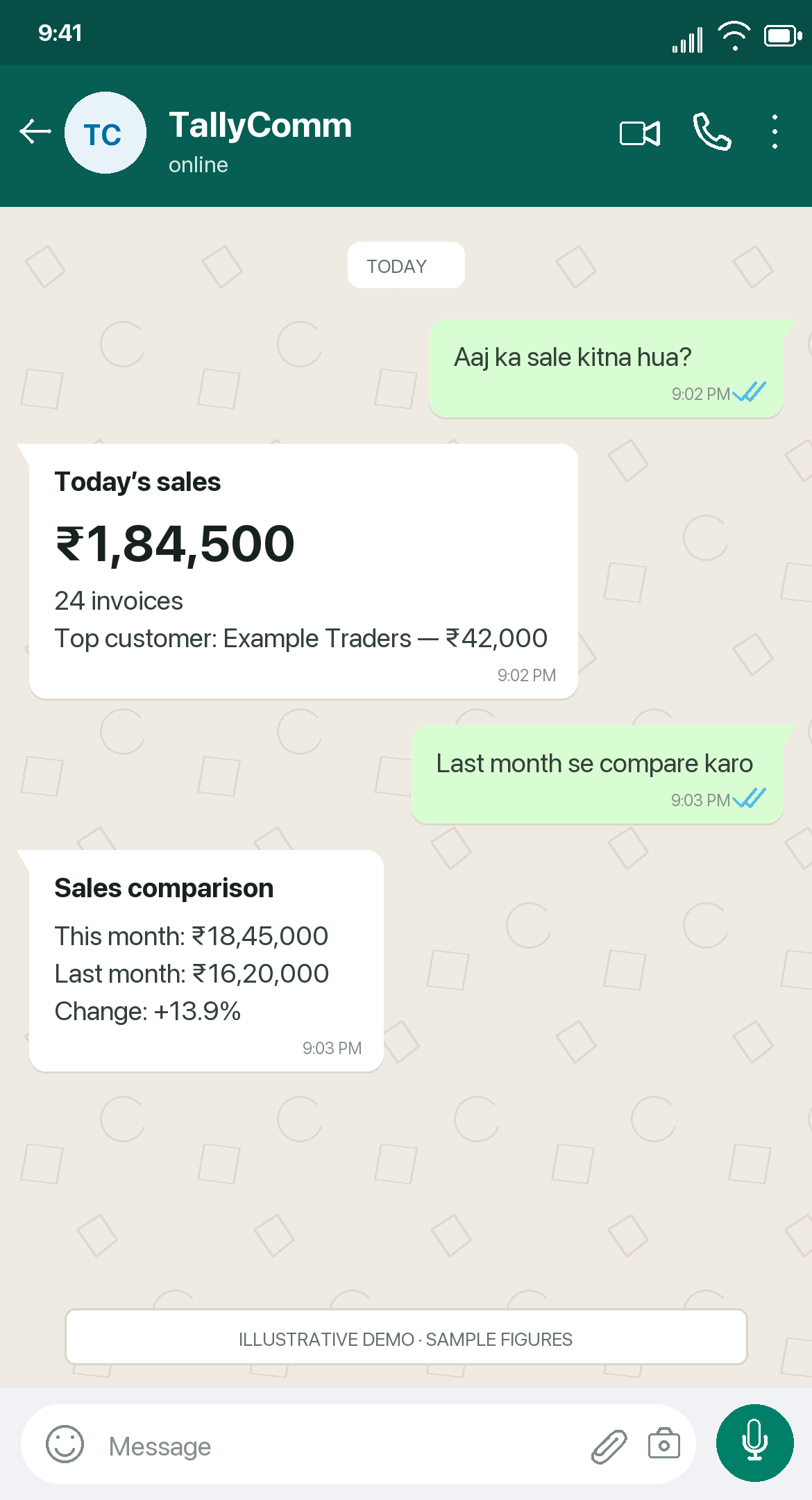
01 / Sales
Check daily sales and compare performance without opening Tally.
You: Aaj ka sale kitna hua? Reply: Today’s sales ₹1,84,500, 24 invoices. Top customer Example Traders: ₹42,000. You: Last month se compare karo. Reply: This month ₹18,45,000; last month ₹16,20,000; change +13.9%.
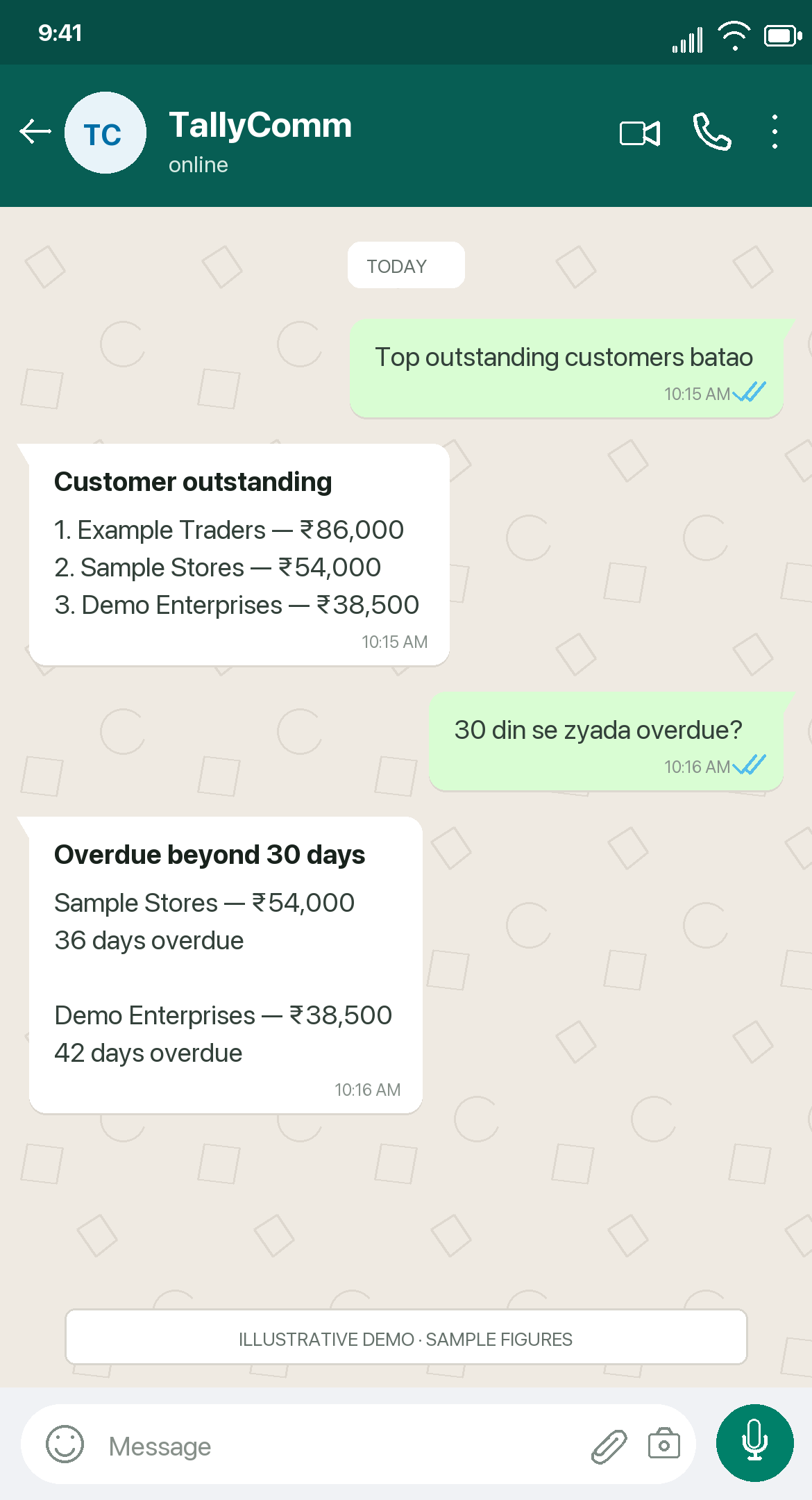
02 / Collections
See outstanding balances and overdue bills before following up.
You: Top outstanding customers batao. Reply: Example Traders ₹86,000; Sample Stores ₹54,000; Demo Enterprises ₹38,500. You: 30 din se zyada overdue? Reply: Sample Stores ₹54,000, 36 days overdue; Demo Enterprises ₹38,500, 42 days overdue.
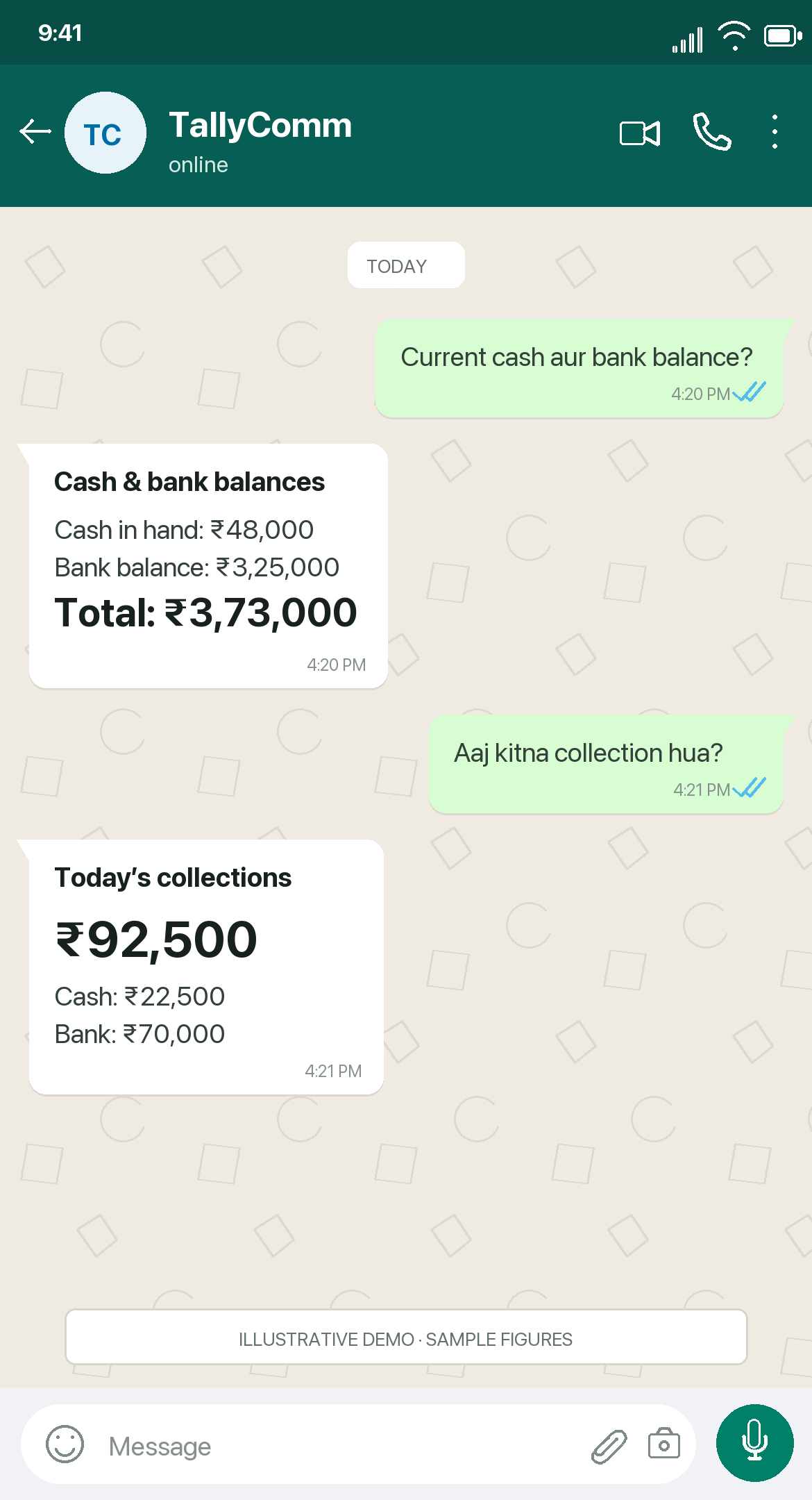
03 / Cash & bank
Review cash and bank balances when your next decision needs them.
You: Current cash aur bank balance? Reply: Cash ₹48,000; bank ₹3,25,000; total ₹3,73,000. You: Aaj kitna collection hua? Reply: Collections ₹92,500, comprising cash ₹22,500 and bank ₹70,000.
Illustrative WhatsApp-style previews with sample figures, not live customer screenshots.
Actual answers depend on your Tally records, permissions, and supported queries.
03 /How it works
We guide you through the connection, users, and permissions—then test the questions that matter to your business.
Share your Tally setup, business questions, and who needs access. We review compatibility and reporting needs together.
Activate the edge agent with guided QR-based setup and connect it to your local Tally system.
Select your Tally company, approve WhatsApp users, and set access appropriate to each person’s role.
Test your first business questions. The agent queries your running Tally system and returns the answer on WhatsApp.
Built on control
Tally continues to handle your accounting. TallyComm gives approved users a read-only way to retrieve information.
Cannot create, modify, or delete accounting entries in Tally.
Live Tally Mode does not sync your complete Tally database to central servers. Messages and routing metadata pass through the service.
Configure permissions so each person can access the information relevant to their role.
Review who asked each question and when through query audit logs.
Live Tally Mode needs a live connection. Keep your Tally system, edge agent, and internet connection running for replies. Offline access and dashboards are outside this setup.
04 /Your team. Your setup.
One owner or a wider team. Tell us about your Tally companies, users, and questions. We’ll help you explore the right configuration.
For owners
Check sales, collections, stock, and cash position from your phone. Go into your next business conversation with the numbers you need.
Book an Owner Demo →For accountants
Reduce routine requests for everyday figures while continuing to manage the books in Tally. Configure access with the owner during setup.
Discuss Your Workflow →For selected teams
Give approved team members relevant visibility. Discuss additional users and company requirements as part of your configuration.
Talk About Your Setup →Pricing depends on your company and user requirements.
Contact us for a demo and a quote tailored to your setup.
05 /Good to know
Have a specific setup in mind?
Send us your question.
Supported versions include TallyPrime 3.0, 4.0, and 5.0+, and Tally.ERP 9 Release 6.0 or later. Share your installed version so we can confirm compatibility during your demo.
No. Live Tally Mode requires Tally, the edge agent, and internet access to be running. If any is unavailable, live questions cannot be answered.
Yes. Approve WhatsApp users and configure permissions during setup so each person gets the relevant access.
Tell us about your business structure and team requirements. We can discuss configuration options and provide a quote for your intended setup.
No. Continue using Tally for entries and accounting operations, and your accountant for managing the books. TallyComm provides conversational, read-only access to your existing information.
TallyComm is an independent integration and is not affiliated with or endorsed by Tally Solutions Pvt. Ltd. The Tally logo identifies the software this integration connects to.
Less waiting. More knowing.
Bring your everyday business questions.
We’ll show you what TallyComm can do.